

Indian Truck Simulator 3D

Indian Truck Simulator 3D is a driving simulation game where players…

Indian Truck Simulator 3D

Indian Truck Simulator 3D

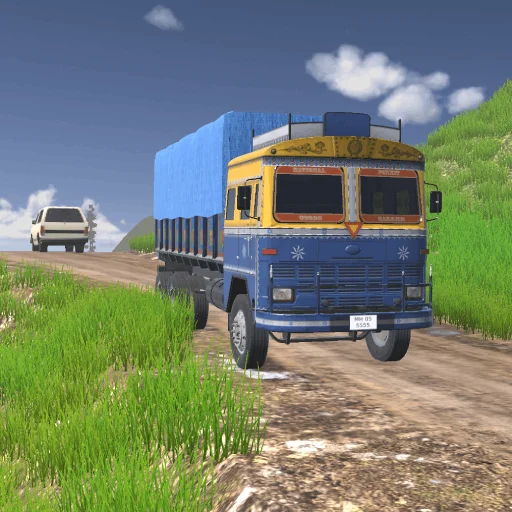
Indian Truck Simulator 3D is a driving simulation game where players take control of heavy cargo trucks and navigate through detailed road networks inspired by challenging regional routes. The game focuses on long-distance trucking, where you transport goods across highways, rural roads, mountain passes, and busy city streets. Each delivery requires careful handling of the truck’s weight, turning radius, and braking distance. Traffic conditions, narrow roads, and unpredictable curves make every trip a test of patience and driving accuracy. Indian Truck Simulator 3D emphasizes realistic truck control and steady progression through increasingly complex routes.

About Indian Truck Simulator 3D!

Indian Truck Simulator 3D places players in the role of a truck driver responsible for transporting cargo across long and varied routes.

Road conditions change frequently, ranging from smooth highways to tight village roads and steep hillside paths.

Each truck behaves differently depending on load weight, requiring careful acceleration and braking control.

Traffic density and road layout often demand slow, precise steering rather than high-speed driving.

The game rewards consistent driving skills, route awareness, and safe cargo delivery over long distances.

How to Play Indian Truck Simulator 3D

Step 1: Start your truck and select a delivery route with a specific cargo load.

Step 2: Drive carefully out of the starting area and adjust speed according to road conditions.

Step 3: Follow navigation routes while avoiding traffic, obstacles, and sharp turns.

Step 4: Manage braking distance carefully, especially when carrying heavy cargo on downhill roads.

Step 5: Deliver goods safely to the destination to complete the mission and earn rewards.

Controls

Indian Truck Simulator 3D uses realistic truck driving controls designed for smooth handling and cargo transport.

W / Up Arrow: Accelerate the truck forward.
S / Down Arrow: Brake or reverse the truck when needed.
A / Left Arrow: Steer the truck to the left.
D / Right Arrow: Steer the truck to the right.
Space: Apply handbrake for sharp stops or controlled parking.
Shift: Engage gear boost or higher speed mode on highways.
C: Change camera view for better driving perspective.
R: Restart the current delivery mission.
Esc: Pause the game or open the menu.

Pro Tip: When carrying heavy cargo, start braking earlier than usual—truck momentum increases stopping distance significantly on downhill roads.

Frequently Asked Questions

What is Indian Truck Simulator 3D?

Indian Truck Simulator 3D is a driving simulation game where players transport cargo using heavy trucks across different road environments.

What is the main goal in Indian Truck Simulator 3D?

The main goal is to deliver cargo safely to its destination without damaging the truck or losing the load.

Why is driving a truck more difficult than a car?

Trucks are heavier, have longer braking distances, and are harder to turn on narrow or curved roads.

Do different cargo types affect gameplay?

Yes, heavier cargo changes vehicle handling and requires more careful speed and braking control.

What causes most accidents in the game?

Most accidents happen due to speeding on curves, late braking, or misjudging narrow road sections.

Is highway driving easier than rural roads?

Highways are generally smoother, but higher speeds can still make control difficult if not managed properly.

Can I change camera views while driving?

Yes, switching camera angles helps improve visibility and makes parking or turning easier.

What is a good strategy for beginners?

Begin with slow driving, focus on lane discipline, and avoid rushing deliveries until you understand truck handling.

Rate INDIAN TRUCK SIMULATOR 3D

4.8 3,589,582 votes