3D Car Simulator

Free-roam the map in three cars and test cameras, handbrake, turbo, and off-road handling.

3D Car Simulator

3D Car Simulator

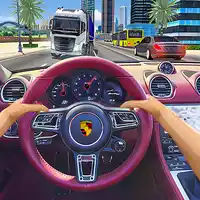
3D Car Simulator is a free-roam driving sandbox rather than a race with a fixed finish line. You can switch between three different vehicles and use the open map to test how each one feels on roads, hills, and rough ground. The police car brings working lights, the rally car is suited to more aggressive off-road exploration, and the older city car gives the environment a different pace.

About 3D Car Simulator

3D Car Simulator is a free-roam driving sandbox rather than a race with a fixed finish line. You can switch between three different vehicles and use the open map to test how each one feels on roads, hills, and rough ground. The police car brings working lights, the rally car is suited to more aggressive off-road exploration, and the older city car gives the environment a different pace. Because there is no single racing route to memorize, the fun comes from creating your own driving challenge.

The game also gives you more vehicle controls than a basic arcade racer. You can change camera views, use a handbrake for tighter slides, trigger turbo, reset the car if an experiment goes wrong, and switch vehicles without treating every crash as a failed level. That makes the map useful as a practice space: learn how braking changes a corner, compare the same road in different cars, or find a wide area where you can experiment with drifts without immediately hitting an obstacle.

How to Play

  1. Choose one of the three vehicles and begin by driving slowly enough to learn its steering and braking response.
  2. Explore the city roads and open terrain instead of following a mandatory racing line.
  3. Use the camera toggle to find a view that makes speed and corner entry easy to judge.
  4. Try the handbrake or turbo only after you have enough space to recover from the extra rotation or speed.
  5. Switch cars and repeat the same route to compare how each vehicle changes the driving experience.

Controls

Control Action
WASD / Arrow Keys Drive and steer
1 / 2 / 3 Change vehicle
Shift Turbo
C Change camera
Space Handbrake
R Reset the map
G Reset the car
E Toggle police lights on the police car

Use the Open Map as a Driving Test Track

The fastest way to understand a vehicle is to repeat the same short route with controlled changes. Drive a corner normally, then try it with earlier braking, then test the handbrake. Because the game lets you reset and switch cars, you can compare handling directly instead of guessing whether a mistake came from the road or the vehicle.

Turbo works best when the car is already pointed where you want to go. Activating it in the middle of a tight corner adds speed when the tires are already being asked to turn, which makes the exit harder to control. Save extra acceleration for straights, open dirt sections, or the moment after the car has finished rotating.

Tips & Strategy

  • Use one familiar road as a reference when comparing the three vehicles; the differences become easier to feel.
  • Brake before a sharp city corner and release the brake as you turn instead of carrying full speed into a 90-degree bend.
  • Tap the handbrake to start rotation, then return to normal steering so the slide does not continue longer than intended.
  • If the car flips or gets stuck, reset it rather than wasting time trying to force the vehicle out of an impossible position.

Related Games

Frequently Asked Questions

Does 3D Car Simulator have a finish line or career mode?

The main experience is free-roam driving. You choose a vehicle and explore the environment rather than completing a fixed race every time.

Which vehicles can I drive?

The game includes three choices: a city-style car, a police car, and a rally car, each giving the same map a different feel.

What does the handbrake help with?

It can rotate the car more quickly for a drift or tight change of direction. Use it briefly, because holding it too long can turn a controlled slide into a spin.

When should I use turbo?

Use turbo when the car is already stable and facing the direction you want to travel. Long open sections are safer than tight corners.

What is the difference between resetting the map and resetting the car?

The reset options let you recover from experiments or bad positions. Resetting the car is useful when the vehicle is stuck; a full map reset is a broader restart.

Why is changing the camera useful?

Different views make different tasks easier. A closer view can feel more immersive, while a wider external view can make drifting, obstacles, and off-road positioning easier to judge.

Rate 3D Car Simulator

4.8 2,114,052 votes